Why a separate mode?
The app keeps track of what your child taps. It fills in the Activity page, learns which words to suggest next, and gives stickers and a little celebration now and then.
When you tap cards yourself, you probably don't want your taps mixed in with your child's. Modeling mode keeps them apart. The cards still speak as usual. Your taps just aren't saved.
Turn it on
Press and hold the gear in the top right corner for 3 seconds. Answer the sum in the "For grown-ups" box. The Parent panel opens.
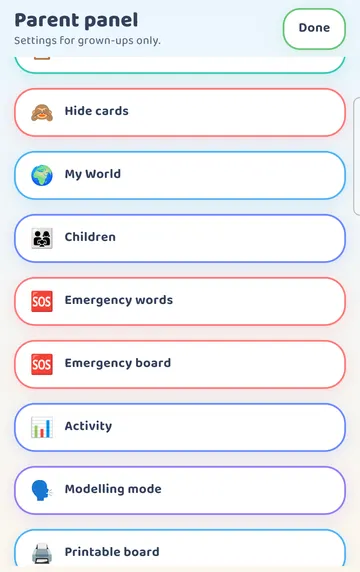
Scroll near the bottom. You will find the "Modelling mode" row.
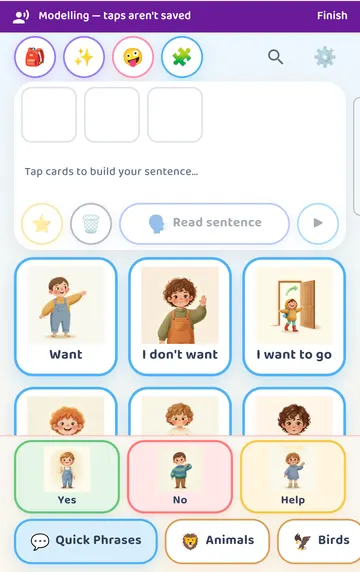
Tap it. The panel closes and a purple banner appears across the top of the board. It says "Modelling — taps aren't saved" and has a Finish button.
If there is an old sentence in the strip, you can clear it first with the bin button.
Tap while you talk
Now use the board the way you would like your child to see it used. Say the words out loud as you tap.
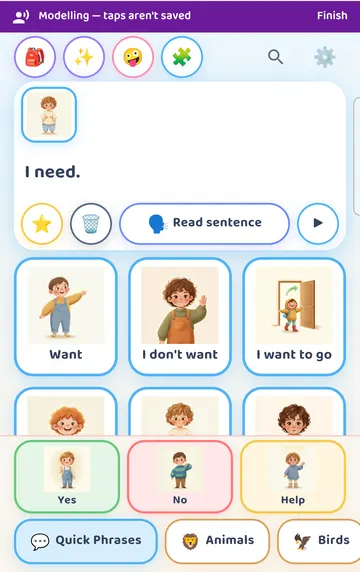
In our example, a grown-up tapped "I need" while saying "I need" out loud. The card spoke, and it went into the sentence strip as usual. The banner stayed up the whole time.
Here is what happens to your taps while the banner is showing:
- The cards still speak.
- Nothing goes into the Activity page or the history.
- The app doesn't learn suggestions from them.
- There are no stickers or celebrations.
We checked this: "I need", tapped in modeling, did not show up in the Activity page's card counts afterwards.
Finish
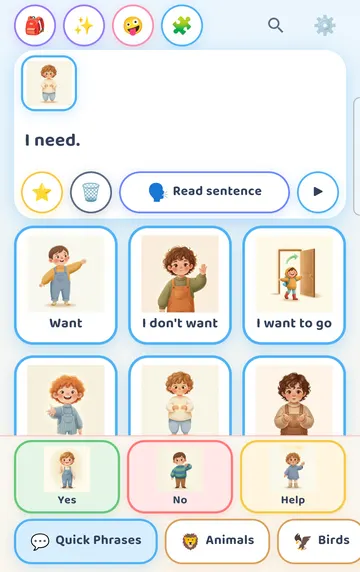
When you are done, tap Finish on the banner. The banner goes away and the board is back to normal. From then on, taps count again.
Modeling mode isn't saved. If the app is closed and opened again, it starts without the banner. So if you see the board without the banner, your taps are being counted.
Ideas for everyday modeling
Keep it short and natural. A few words at the right moment are plenty.
At snack time, tap "I want" and a food card while you say, "I want an apple." Then hand the board over, or just carry on with snack.
When you are leaving the house, tap a card for where you are going as you say it.
If your child reaches for the board while you are modeling, let them. You can tap Finish first so their taps count, or leave the banner up if you are still showing them something.
Don't worry about getting it "right". There is nothing to score and nothing is saved.
Try it
- Press and hold the gear for 3 seconds and answer the sum.
- Scroll near the bottom of the Parent panel and tap "Modelling mode".
- Check that the purple "Modelling — taps aren't saved" banner is showing.
- Pick one everyday moment, like snack time.
- Tap two or three cards while you say the words out loud.
- Tap Finish on the banner when you are done.
- Try it again another day, at a different moment.
This is practical guidance from the people who make Talking Cards, not clinical advice. Your child's speech-language pathologist knows your child best.